Storage and sound in a media wall: consoles, speakers and hidden boxes
A media wall is only as calm as what it hides. How to plan storage for consoles and streaming boxes, where to put speakers and soundbars, and how to keep everything cool and reachable.
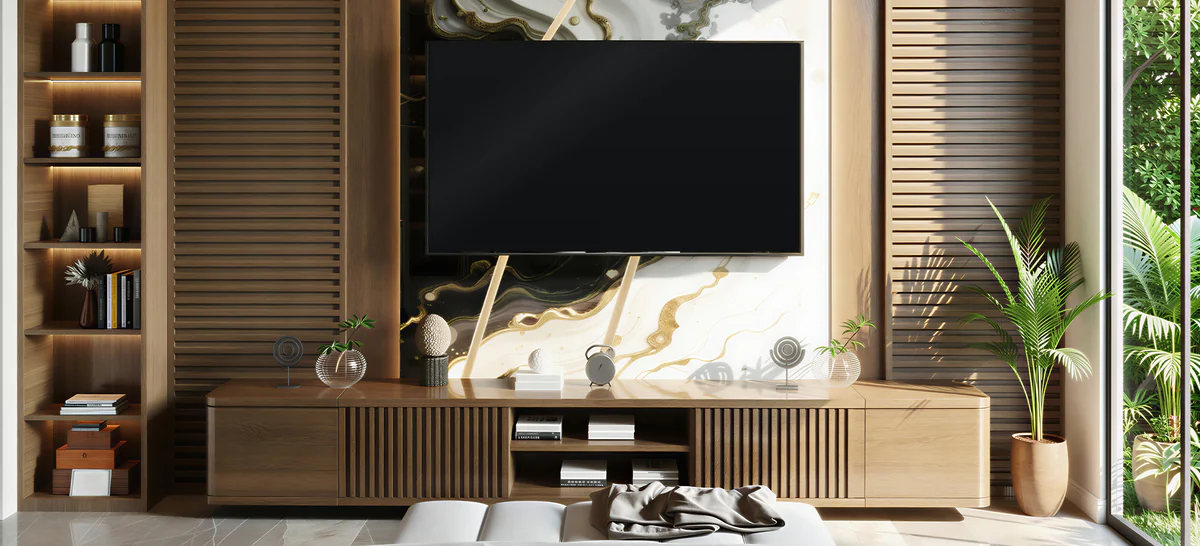
The beauty of a media wall is what you don’t see: no tangle of cables, no boxes stacked under the TV, no speakers on stands. Achieving that calm look takes careful planning of storage and sound before any joinery is made.
Start with your equipment
List everything the wall needs to hold: TV, soundbar or speakers, subwoofer, streaming box, games consoles, router, set-top box and anything else you plug in. Note the sizes and how each one connects. This list shapes the cupboards, the cable routes and the sockets.
Equipment cupboards
- Ventilation: electronics produce heat. Vents, open backs or slotted panels keep air moving.
- Remote signals: infrared remotes need a clear line to the box. Glass, fabric or slatted doors — or a small IR repeater — solve this.
- Access: pull-out shelves make it easy to plug in new equipment.
- Power: enough sockets inside the cupboards, so there are no extension leads on the floor.
Consoles and games
Games consoles often need to sit closer to hand, with room for controllers, headsets and charging. A dedicated drawer with a charging point inside keeps controllers tidy and ready to use.
Sound
A soundbar works best directly below the TV, facing the room. A shallow recess or shelf, sized to the soundbar, keeps it neat without blocking its sound. For surround sound, speakers can be hidden behind acoustic fabric panels, slatted sections or speaker cloth set into the joinery, with a ventilated cupboard for the subwoofer.
Don’t box the sound in. Speakers and soundbars need open space in front of them. Ask for the speaker maker’s guidance, and keep solid doors and deep recesses away from the drivers.
Cable routes
Run cables through generous ducts inside the wall, from the TV down to the equipment cupboard and across to speakers. Leave a spare draw-cord in each duct so new cables can be pulled through later, and add an access panel behind the TV for the mount and connections.
Open shelving and display
Not everything has to be hidden. Lit open shelves either side of the screen give a place for books, photos and objects, and balance the dark rectangle of the TV. Keep the shelves for display and the cupboards for equipment, and the wall stays calm.
Plan storage and sound together with the design of the wall, and the result is a media wall that looks effortless, sounds great and is easy to live with for years.
Keep reading
-
 Media Walls
Planning a media wall: TV size, viewing height, fires and cables
A media wall should make a living room calmer, not busier. The measurements, electrics and fire details to settle before choosing finishes.
4 min read Read article -
 Media Walls
Slats, stone or lit shelving: choosing a media wall finish
Once the layout is fixed, the finish sets the mood. How timber slats, stone effects, paint and lighting compare on a media wall.
4 min read Read article -
 Media Walls
Electric fires in media walls: what to know before you choose
A built-in fire makes a media wall the warm heart of the room. How to choose the fire, where to place it and what it needs behind the scenes.
4 min read Read article